
 to return
Background
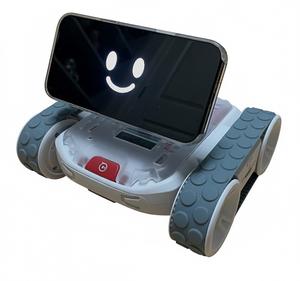
The goal. To build a better friend-like companion robot than what is currently available, by leveraging the full ChatGPT 5 features like internet access, memory, voice chat, real-time video feed, etc. Note that other robot companies will not touch all or most of these important features for their more general users that do not expect to pay a monthly service fee.
The impetus. I have had no aspirations of ever building my own robot, and have been perfectly content collecting robots that entertain and engage me in ways I had always hoped they would. But 4 events changed this dynamic:
- Since the release of the ChatGPT Voice Mode API in 2024, almost every new robot pivoted its design to try to be a companion robot by using the new API. Not only were there great new robots like Baby Alpha and LOOI, but some older robots like Loona added among the best implementations of the API in its unmatched firmware releases.
- LOOI's design was particularly interesting, because it removed perhaps the highest cost of a companion robot (i.e., the brain and animated face) by leveraging a very powerful computer and screen that users already own (i.e., their smarphone), and just creating a basic robot body to embody the power of ChatGPT's companion features.
- While at the same time, the ChatGPT iOS app itself kept improving. And with the advent of ChatGPT 5, it finally had the core features needed to be a great companion by adding support for a real-time video feed and internet access to its already world-class realistic Voice Mode and memory access.
- However, despite continued enhancements (many requested by me), these companion robots fell short of the great potential of the ChatGPT iOS app, since they knew their users would not pay for a monthly service fee, and thus they used the most economical version of the API, so that the monthly transactions costs did not offset the robot price by very much.
The epiphany. So after waiting over a year for a companion robot that would never happen, my frustration lead me to ask ChatGPT in Summer 2025 how feasible it was for me to create my own companion robot that would leverage the full ChatGPT with Voice Mode and Real-Time Video Feed API, using the design principle demonstrated by LOOI - perhaps in a one-year phased timeline. To my surprise, ChatGPT said it was a great idea that I was totally capable of implementing.
Design Choices

The premise. To build the most advanced consumer companion robot available in 2025/2026 by leveraging existing technologies. This starts with my own iOS app on my own everyday powerful iPhone that uses all its sensors (mic, speakers, camera, LiDAR, computer vision, 3D environment mapping, etc.) and the full capabilities of ChatGPT to create an engaging companion with an expressive face, an emotive head/neck, and a reasonably fast body that freely explores with autonomy. There are no machined or 3D-printed parts (except for the shell to cover the hardware), but instead only off-the-shelf components that require basic assembling with no soldering.
Since this was the area I was least interested in, I totally relied on ChatGPT to choose the right hardware that met the project requirements. And as usual, we made compromises, some bad decisions, and lots of pivoting along the way.
The body parts. While the value of the robot is in its personality, there is some complexity to its basic body.
- Head. Represented by the brain/face which are the core of the robot.
-
Brain/Face. Controls the robot, and provides hearing, speech, sight, environment awareness, and facial expressions.
- 🦿 iPhone 16 Pro Max Smartphone
- 📲 My own Rover iOS app
- 📲 ChatGPT service
-
Brain/Face. Controls the robot, and provides hearing, speech, sight, environment awareness, and facial expressions.
- Upper Body. Represented by the body controller which coordinates movement, and the neck gimbal which provides the head movement.
- Neck. Moves around head with motorized, MagSafe, and mountable pan/tilt solution.
Even though I was more focused on the robot's personality, I did want to give it some cool physical movement to make it feel more alive, so I settled on this two-axis neck movement to allow expressiveness. However, due to the phone's soft MagSafe connection for easy mounting/unmounting, I did not want a neck gimbal with high-powered servos that would require more power than the RVR+ provided nor could fling the phone off the magnetic connection. So after trying an Adafruit 3D-printed gimbal whose construction and S90 servos could not handle the half-pound weight of the phone, we settled on a metal Lynxmotion gimbal with stronger HS-5085MG servos that would allow a smoother yet not jolting movement. This needed a Gimbal Controller, so the PCA9685 was the clear choice.
- 🦿 Lynxmotion Micro Pan-Tilt
- 🦿 Hitec HS-5085MG servo (2x)
- 🦿 Moment Pro Tripod Mount for MagSafe
- 🦿 HiLetgo PCA9685 16-Channel PWM Driver Servo Controller
- Body Controller. Coordinates iPhone control of neck and lower body by providing a Bluetooth access layer.
Because the Gimbal Controller is not very smart -and- the drive base did not expose its Bluetooth API, I needed a middle-ware Body Controller to control the gimbal and the drive base, while providing a Bluetooth connection to my phone app which would control everything from a higher level. After struggling with drive base compatibility for weeks (first Arduino which we realized was no longer supported, then Raspberry Pi Zero 2 W and 2 Raspberry Pi Zero WHs which had UART issues although mostly was probably faulty wiring), this ended up being a Raspberry Pi 3 B+ small computer mounted in the upper body.
- 🦿 Vilros Raspberry Pi 3 B+
- 🦿 SanDisk 32GB
- 🦿 Misc. hardware (breadboard, jumper cables, screws, ties, USB cable, etc.)
- 📲 Sphero SDK
- 📲 My own rover_body_controller.py utility and its supporting unit files:
- 📲 My own rover_drive_base_commands.py
- 📲 My own rover_neck_commands.py
- Neck. Moves around head with motorized, MagSafe, and mountable pan/tilt solution.
- Lower Body. Represented by the drive base which provides movement through the environment, and provides power to the upper body.
- Drive Base. Moves around whole body throughout the environment, and provides basic lower body movement gestures
- 🦿 Sphero RVR+ Robotic Platform
While there were a lot of options for drive bases, this was the only one to meet my key requirements:
- PROS
- major: large enough for handling big phone and decent gimbal
- major: sturdy
- major: relatively fast enough to maneuver around the house in a reasonable timeframe
- major: provides 5V/2A power to peripherals (and unlike LOOI, I do not expect this to include charging phone), so I can avoid external battery
- medium: futuristic-looking
- CONS
- medium: no Bluetooth interface (only medium since need bluetooth-capable for gimbal controller anyway)
- medium: old SDK
- medium: only works with old Python version
- medium: only works with older Pi hardware
- minor: no battery charging port while in robot
- minor: limited mounting plates
- Drive Base. Moves around whole body throughout the environment, and provides basic lower body movement gestures
Phased Plan
Building blocks. To be able to experience some real results as soon as possible, I laid out a phased plan:
- Phase 1. App-based robot control with full hardware
- Started: 2025-10-03
- Completed: 2025-11? (2-week vacation in-between)
- Obtain Sphero RVR+ robot
- Drive with Sphero Edu app to learn traction/turn radius
- Obtain all remaining hardware for Body Controller and Gimbal
- Assemble all hardware and develop/test all control interfaces
- Code basic controller app
- Phase 2. Voice-based robot control
- Code responding to local voice commands (“forward/back/left/right/stop”, speed/duration slots)
- Phase 3. ChatGPT integration
- Code full integration with ChatGPT Realtime API
- Provide prompt defining embodiment, abilities, behavior, and feedback commands
- Code support for drive base and head movement commands as directed by ChatGPT alongside speech or when in limbo
- Phase 4. ChatGPT visualization
- Code a simple avatar (orb/eyes) animation from ChatGPT alongside speech or when in limbo without affecting audio latency
- Phase 5. Long-term memory support
- Code coordinating summaries from ChatGPT to save most significant information via SQLite plus “memory cards” in association with relevant conversation person
- Phase 6. Real-time vision support
- Code on-demand frame snapshots (3–5 fps)
- Test by request to look at object
- Phase 7. Computer-vision navigation
- Code simple local avoidance with ARKit mesh
- Code parameters for exploring and following
- Phase 8. Production completion
- Polish reliability (reconnect/backoff)
- Code API cost caps
- Code privacy settings
- Code memory editor UI
- Code personality sliders (talkativeness, animation intensity)
- Code tolerances including telemetry (latency, tool calls, errors)
Assembly & Wiring
Off-the-shelf and no-soldering. The point of this project was not to build sophisticated companion hardware, but instead to leverage the most sophisticated companion software, ChatGPT iOS app in Voice Mode with Real-time Video Feed, and provide a decent physical embodiment to seal the perception of life.
Note to pay particular attention to Raspberry Pi wiring, considering our first 2-day phase took 20 days and many headaches due to our wiring of the jumpers to the wrong pins on the Pi board. I did not realize this until I almost gave up on the project, but had one last epiphany of checking Sphero SDK diagrams instead of relying on no diagrams (and just relying on ChatGPT direction).
- Flash the SD card with Raspberry Pi Imager app, then insert in Pi
- Device: Raspberry Pi 3
- OS: Use custom
- Download the last Bullseye build (dated 2023-05-03) from:
https://downloads.raspberrypi.com/
raspios_lite_armhf/images/ - Filename:
2023-05-03-raspios-bullseye-armhf-lite.img.xz
- Download the last Bullseye build (dated 2023-05-03) from:
- Hostname: roverpi.local
- Username: pi
- Wireless LAN: (local Wi-Fi credentials)
- Locale Settings: America/Chicago, us
- Enable SSH: ON
- Secure Raspberry Pi in its “case”
- Connect all key parts: Pi, RVR+, and PCA9685
- ground
- Connect 10cm female-to-male black jumper from RVR+ GND pin to breadboard ground rail
- Connect 10cm female-to-male black jumper from Pi GND pin (pin 6) to breadboard ground rail
- Connect 10cm female-to-male black jumper from PCA9685 GND pin to breadboard ground rail
- power
- Connect 9.5" USB-A to micro-USB cable from RVR+ USB port to Pi USB power port
- Connect 10cm female-to-female red jumper from RVR+ UART +5V pin to PCA9685 V+ pin
- Connect 10cm female-to-female red jumper from Pi 3.3V pin (pin 1) to PCA9685 VCC pin
- data
- Connect 10cm female-to-female yellow jumper from RVR+ UART RX pin to Pi TX pin (pin 8)
- Connect 10cm female-to-female orange jumper from RVR+ UART TX pin to Pi RX pin (pin 10)
- Connect 10cm female-to-female jumper from Pi SDA1 pin (pin 3) to PCA9685 SDA pin
- Connect 10cm female-to-female jumper from Pi SCL1 pin (pin 5) to PCA9685 SCL pin
- control w/power
- Connect cable for top HS-5085MG servo to PCA9685 Slot 1
- Connect cable for bottom HS-5085MG servo to PCA9685 Slot 2
- ground
- Provide Pi power, wait for initial boot, and ssh in
- Connect USB-A from computer or dongle to Pi micro-USB port, temporarily replacing USB cable from RVR+
- Wait a minute or two, and check if can access with
ssh pi@rover.localto confirm boot is complete - If ssh connects:
- Are you sure you want to continue connecting (yes/no/[fingerprint])? yes
- Note that you may have to first clear info if re-flashed multiple times:
ssh-keygen -R roverpi.local - Force a clean boot via ssh:
sudo reboot
- Copy all our scripts (including install scripts) onto Pi from a separate Terminal window
scp -r /My Drive/Code/rover_utilities/* pi@roverpi.local:~/robot/
- Run install scripts on Pi in Terminal ssh window:
sudo ~/robot/install/step_1_prep_os.sh- Ensure to respond to any shell prompts:
- The serial login shell is disabled (“No” to the prompt)
- The serial interface is enabled (“Yes” to the prompt)
- Ensure to respond to any shell prompts:
- (reboots)
ssh pi@rover.localsudo ~/robot/install/step_2_install_sphero_sdk.sh- Disconnect Pi USB power from computer or dongle, and connect to RVR+ USB port
python3 ~/robot/install/step_3_quick_drive.pysudo ~/robot/install/step_4_prep_auto_start.sh
Project Guidelines

Always be mindful. Over-arching concepts to try to stick to:
- Build on a single app, so avoid temporary code unless necessary for partial progress, and consider reusable logic towards the end goal
- Keep audio, motion, head, and expression on separate queues with their own safety rails - prevents one subsystem from blocking another
- Start every new tool with a strict JSON schema + validation; log rejected calls so you can refine prompts quickly
Timeline & Milestones

No rush. In retirement, set loose goals:
- 2025 mid-Nov. Start Phase 2 after Japan vacation
- 2026 Jun. Target six months to Phase 5 MVP (Minimum Viable Product)
- 2026 Oct. Target ten months for complete project (originally planned 1 year)
Branding
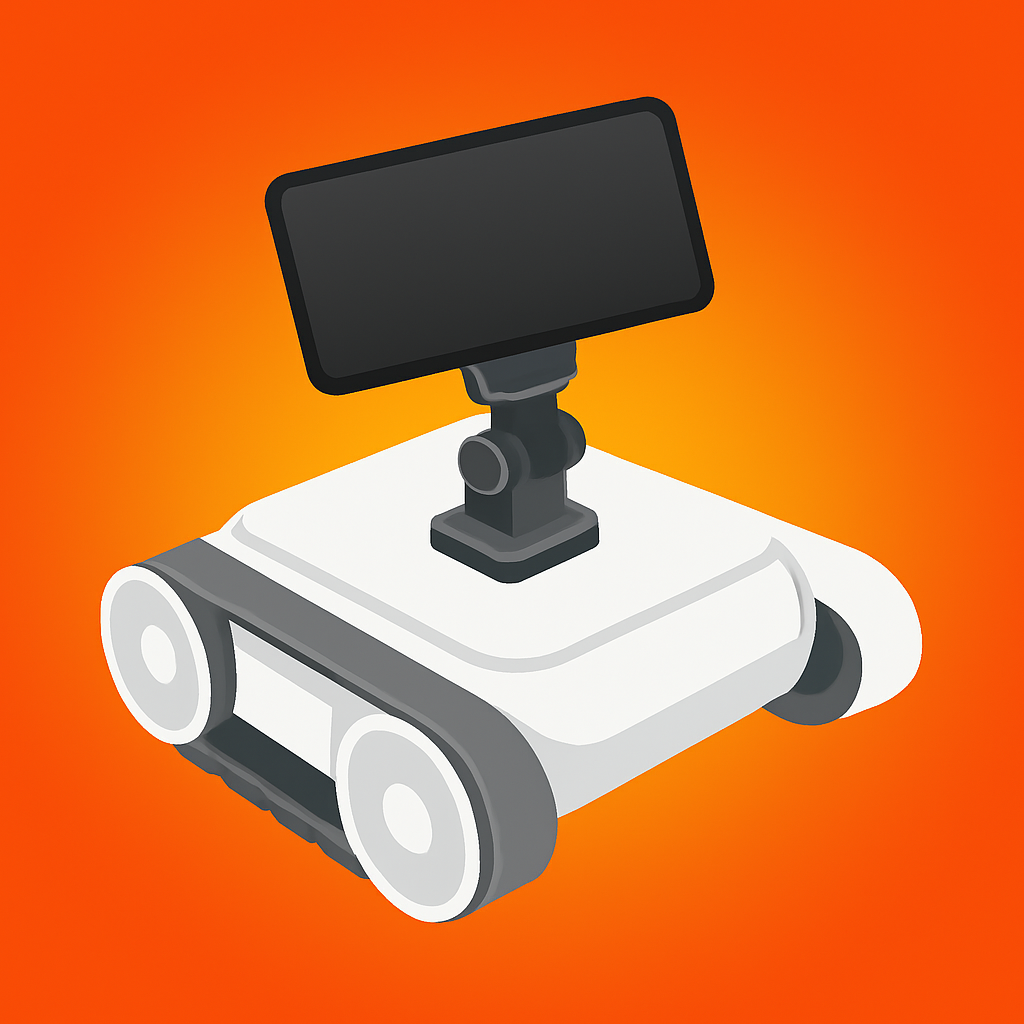
Vibrant and friendly. This is the project mantra.
- Name. Play on drive base RVR+ name and dog companion name
- Custom Icon Colors. See image above
- head (phone): black
- neck (gimbal): dark gray
- drive base (body): white
- drive base (treads): gray
- background: neon-orange